


YayTalk: Speak & Learn English
4.7165.00 Reviews
App Specs
- Version
- 1.3.4
- Updated On
- License
- Free
- Downloads
- 1,000,000+
- Developer
- IdeaLabs.
- Categories
- Education
- Platform
- Android
Screenshots

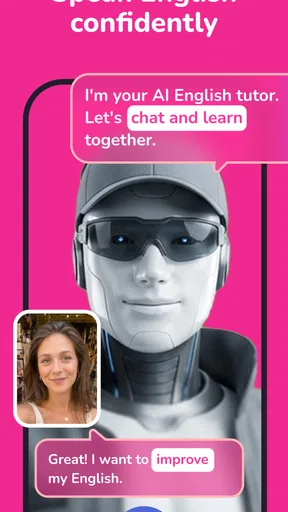
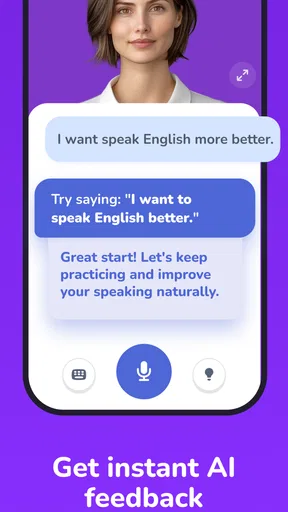
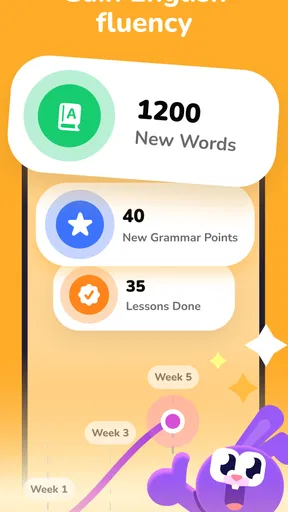
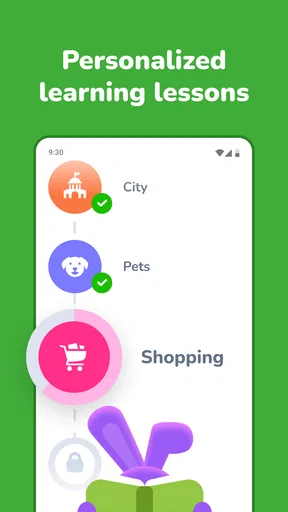
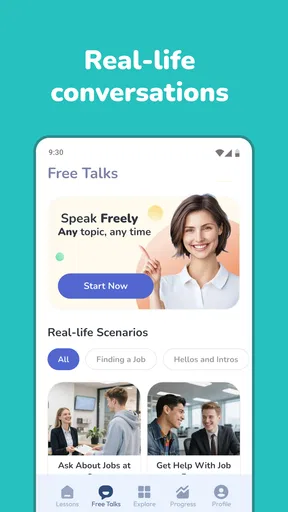
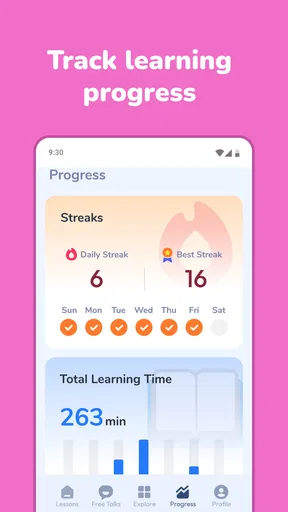
 Analysis by AppCompare
I can see YayTalk being useful in a home where one person wants to practise English but rarely gets a quiet stretch of time alone. Its AI-tutor approach makes conversation the central activity, which suits short moments between chores, study, or work better than a lesson that demands a desk and a full hour. My main reservation is practical: a shared device can make learning convenient, but it also makes personal accounts, saved progress, and speaking privacy worth thinking through before everyone takes turns.
When a shared device can make practice easier
One ordinary household scenario is a learner who has ten minutes while dinner is in the oven, or while waiting for a ride. With a conversation-based app, that small opening can become a chance to practise saying something rather than merely planning to study later. I would keep the goal modest: rehearse how to ask for directions, explain a schedule, or make a simple request. A short, specific aim is easier to carry into the next real conversation than a vague intention to “get better at English.”
The app is a better fit for that moment than a long video lesson, because watching and listening can leave a learner feeling familiar with English without having to produce it. It also differs from a quick translation search: a translator helps solve one immediate wording problem, while a speaking practice session asks the learner to form a response. Neither tool replaces the other. If I needed the exact wording for an urgent message, I would use a translation tool; if I wanted to become less hesitant next time, I would practise the exchange.
A useful habit is to choose the situation before opening the app, then keep a note afterward of one expression that felt hard to say. That small record can help a learner notice recurring gaps without turning practice into a scorekeeping exercise. I would not try to write down every correction or remember every turn. The point is to leave with one phrase worth trying again, not a second homework assignment.
English practice that can fit around household routines
I find that English practice is easiest to keep up when it attaches to a routine that already exists, rather than competing with the household’s busiest hours. A small plan—choosing a quiet window and deciding who goes next—can make shared-device use feel considerate without turning it into a formal family lesson. From there, the key question is how each person can take a separate turn while keeping the experience personal.
Taking turns without turning practice into a family lesson
For a household, the most realistic use is not a group lesson but a sequence of individual sessions. One person might practise a few phrases after breakfast, then leave the device for another learner later. That can lower the barrier to speaking English: the phone is already nearby, and practice does not have to become a scheduled family activity.
Still, conversational learning is personal. A beginner may want to repeat simple sentences without an audience, while a more confident learner may be comfortable speaking with someone nearby. I would treat a shared room as a useful place to practise only when the learner feels at ease. If other people are listening, it can be harder to take risks, make mistakes, and keep talking.
Worth Reading Before You Choose

Baby Panda World Brings Quick Play to Modern Phones, but Its Game Library Feels Busy

ESPN’s Live Game View Makes Following Close Games Easier

QuizzLand Review: A Good Fit for Short Trivia Breaks, Not Every Player

Basketball Stars: Multiplayer Is Fast, but Can It Recover When Matches Go Wrong?

WEBTOON Turns Phone Updates Into a Better Reading Routine

Link to Windows Runs on Shared Habits, Not Social Feeds
A practical routine is to agree on whose turn it is and to use a separate session for each person rather than passing the phone mid-conversation. That small boundary helps prevent one learner’s practice from becoming mixed with another’s. It also gives each person a chance to begin with their own goal, instead of inheriting whatever the previous user was doing.
This is where YayTalk’s conversational focus is appealing, but it also sets expectations. I would choose it for learners who want to speak and respond, not for a household looking for a shared display of vocabulary cards or a group quiz. Its value is in giving an individual a reason to produce language, even during a short window of time.
What to decide before sharing a phone or tablet
I would not assume that a shared device automatically means shared learning. Before another person starts, decide whether the household will use one person’s account or keep learning separate. The second approach is generally easier to understand when different people have different ability levels or goals, though it depends on how the app handles accounts and sessions. I would check the available sign-in and profile options directly rather than rely on an assumption.
There is also a useful distinction between sharing hardware and sharing a learning record. A parent might lend a phone to a teenager for practice without wanting the teenager’s work treated as the parent’s own progress. Likewise, two adults may be happy to share the device but prefer to keep their study histories private. Establishing that expectation first avoids confusion later.
For a quick handoff, I would finish the current conversation, return to a neutral point in the app, and let the next learner start fresh. This is simple coordination, not a claim that the app provides household profiles or a dedicated family mode. It is a sensible habit for any shared learning device, especially when the point of practice is to build confidence rather than monitor one another.
If the phone is also used for work, school, or personal messages, a quiet place and a deliberate time slot can matter more than a complicated schedule. A learner who feels watched may give short, cautious answers; someone with a little privacy is more likely to experiment. The AI tutor is most useful when the learner is willing to speak honestly, including when they do not know a word.
Coordinating practice around different levels
Households rarely have one shared English level. A child beginning with basic phrases, an adult preparing for travel, and a fluent speaker polishing everyday conversation need different kinds of practice. I would avoid making one person’s session the template for everyone else. Instead, each learner should start with a concrete personal aim, such as introducing themselves, asking for help, or describing a routine.
That goal-first habit is a useful way to make short practice more meaningful. Before opening the app, choose one situation to focus on; afterward, note a phrase that was difficult and try using it in another conversation. This creates continuity even if sessions are brief and irregular. It also reduces the temptation to measure progress only by time spent or by how many turns someone completed.
For shared use, coordination can be as simple as agreeing not to interrupt a speaking session and not to correct another learner unless they ask. Unrequested corrections can make an already self-conscious speaker withdraw. If a family member wants to help, they can ask what the learner was trying to say and offer a suggestion afterward, rather than turning the conversation into a test.
There is a trade-off here: an AI tutor can make it easier to practise without recruiting a relative as a conversation partner, but it does not replace the social experience of speaking with a patient person. I see it as a low-pressure rehearsal space. For pronunciation feedback, spontaneous human conversation, or a teacher who can explain why a phrase sounds unnatural, a tutor or language exchange may be a better complement.
Age, trust, and realistic expectations
YayTalk is rated Everyone, so its stated audience is broad. That can make it easier for a household to consider for different ages, but an age label is not a substitute for a parent’s judgement about a particular child. I would sit with a younger learner at first, see how they respond to speaking practice, and decide whether the device and learning routine are suitable for them.
Because the app is described as using an AI tutor, I would also explain the experience plainly: the learner is practising with software, not speaking to a human teacher. That distinction matters for children and adults alike. It helps keep expectations realistic and gives families a natural chance to discuss what should or should not be shared during any digital conversation.
For an adult learner, the same point is about trust and comfort. Speaking aloud can feel more personal than tapping through a vocabulary exercise. If someone is uneasy practising in a common room, they may prefer a private moment or a different learning format. There is no benefit in insisting that a conversational tool suits everyone in the household simply because it is easy to install.
YayTalk is free to start, while optional in-app purchases range from $9.99 to $59.99 per item. In a shared household, I would make the purchase boundary explicit before handing over the device, particularly if a child can access its app store account. The app’s current version is 1.3.4, and it requires Android 7.0 or later. Those details are useful when deciding which household device can run it, but they do not answer how every account or purchase is handled; check the settings and purchase prompts on the device you plan to use.
Where it fits among language-learning options
Compared with a conventional vocabulary app, YayTalk’s strongest appeal is that it puts spoken exchanges closer to the centre of practice. Vocabulary drills can be better when a learner wants repetition, spelling, or a clearly structured review task. A human class is better when the learner needs a teacher to diagnose recurring errors, explain grammar in depth, or adapt a lesson in real time. YayTalk sits between those choices: more conversational than a stack of flashcards, but not a replacement for a teacher or a real conversation partner.
That middle position is especially useful for someone who understands more English than they feel able to say. A brief spoken practice session can help bridge the gap between recognising a phrase and using it. It is less compelling for a learner whose main challenge is reading academic texts, preparing for a formal exam, or getting detailed writing corrections. In those cases, a course or specialist study tool may match the goal better.
The app is published by IdeaLabs and belongs to the education category. It has a 4.7 average from around 12,000 ratings, with more than 1 million installs. Those figures suggest that it has found an audience, but they do not tell me whether its particular conversational style will suit a quiet beginner, a child, or a household sharing one screen. I would judge fit by trying a short practice session and seeing whether the learner actually wants to speak again.
Questions I would settle before making it a routine
A common practical question is whether one installation is enough for everyone at home. I would separate that from the question of whether one account is right for everyone. The device may be shared, but learning goals and records can be personal; check the account choices in the app before building a routine around multiple learners. If the available setup does not make the boundaries clear, I would avoid using one person’s account as a catch-all.
Another question is whether a learner needs a long, uninterrupted block. I would start with a short turn and see whether speaking feels manageable, rather than waiting for a perfect study window. Short sessions suit a busy home, but they can feel fragmented if each learner jumps between unrelated topics. Keeping a simple goal in mind from one sitting to the next gives those small windows some continuity.
Families may also wonder whether it works for a complete beginner. I would treat that as a personal fit question rather than assume every beginner will enjoy an AI conversation. Someone who freezes when asked to speak may prefer to learn a few core phrases first, then use the app as rehearsal. A learner who already understands basic English but avoids speaking is more likely to appreciate conversational practice right away.
Finally, the right choice depends on what “improvement” means to the learner. If the goal is confidence in ordinary exchanges, speaking practice is a sensible focus. If the priority is accurate essay writing, grammar explanations, or exam strategy, a structured course or teacher is likely to serve better. I would use YayTalk alongside those options only when its spoken practice fills a real gap, not simply because adding another app feels productive.
My household verdict
I would recommend YayTalk to a household member who wants accessible speaking practice and can use the device with enough privacy to feel comfortable. It is a particularly reasonable choice for someone who tends to postpone English study because a full lesson feels too demanding. A short, focused turn can make practice easier to begin, and a specific everyday goal gives that turn a purpose.
I would be more cautious about making it a communal family app. Different ages and levels call for individual boundaries, and one person’s account or learning record should not automatically become everyone’s shared space. Agree on turns, clarify who is using which account, and discuss purchases before a child uses the device. Those are household habits, not features I would presume the app offers.
YayTalk is free to try, with optional purchases, and its 4.7 average is encouraging without being a guarantee of personal fit. For a learner who wants to speak more often, I think it is worth considering. For someone who needs structured exam preparation, detailed instruction, or real human feedback, I would choose a more specialised option or use this app only as a supplement. In a shared home, it works best when the device may be shared but each learner’s practice remains their own.
Pros
- Short speaking exercises make it easier to practice in spare moments.
- Voice-based activities help build confidence speaking aloud.
- A useful option for learners who want practice beyond textbooks.
- Progress-focused lessons can help make regular study feel rewarding.
- Suitable for practicing English independently at your own pace.
Cons
- Speaking practice is less useful in noisy places or without a microphone.
- Beginners may need extra guidance with grammar and pronunciation.
- Learning results depend on consistent practice outside the app.
- Some features or lessons may require payment or a subscription.
- Voice recognition can misinterpret accents or background noise.
FAQs for YayTalk: Speak & Learn English
What is YayTalk: Speak & Learn English?
YayTalk is an English-learning app focused on helping users practise speaking and build confidence through conversational activities. Its features may include guided lessons, speaking exercises, pronunciation practice, or AI-supported conversations, depending on the version available in your region. Before downloading, check the app listing for the current feature set and supported proficiency levels, since content and tools can change with updates.
Is YayTalk suitable for beginners, or do I need prior English knowledge?
The app may be useful for learners at different stages, but the best fit depends on its available lesson levels and how much guidance you want. Beginners should look for basic vocabulary, clear explanations, and slower practice options, while more experienced learners may prefer open-ended conversations and feedback. Review the app’s description and sample screens to confirm that its current curriculum matches your level.
Does YayTalk provide feedback on pronunciation and speaking mistakes?
Speaking-focused apps commonly use voice recognition or conversation prompts to help learners practise, but the type and accuracy of feedback can vary. Check whether YayTalk identifies specific pronunciation issues, suggests corrected phrases, or simply lets you speak through an exercise. Recognition may also be affected by background noise, microphone quality, accent, and internet access, so treat automated feedback as a practice aid rather than a substitute for a teacher.
Is YayTalk free to download, and are there subscriptions or in-app purchases?
The download may be free while some lessons, speaking tools, or other features require a subscription or one-time purchase. Pricing, trial availability, and included content can differ by country and may change over time. Check the Google Play or App Store listing before signing up, including the renewal terms and cancellation process, and review any payment confirmation carefully if you start a free trial.
What permissions and internet access might YayTalk need?
Because YayTalk is designed for speaking practice, it may request microphone access so you can record or participate in conversations. Some features may also require an internet connection to load lessons, process speech, or sync progress; offline availability should be confirmed in the store listing or app settings. Grant only the permissions needed for the features you choose, and consult the privacy policy to understand how voice data and account information are handled.


